A bit of a play with the Kowa Prominar 8.5mm f/2.8.
Here is a 5-shot panorama taken of an oyster lease in Merimbula Lake.
Shot in portrait mode, 3 shots were taken at each position with under and over exposed shots in addition of the normal exposure. These were then processed in Adobe Camera Raw and exported as uncompressed TIFF files before going through Photomatix. The resultant 5 images were then merged using Photoshop CS5. There was no need to correct distortion or vignetting which were very essentially non-existent.
Wednesday, 8 April 2015
Tuesday, 31 March 2015
Kowa Prominar 8.5mm f/2.8 for Micro Four Thirds
Introduction
I have been waiting months and months for the Voigtlander 10.5mm f/0.95 and while I knew about the Kowa Prominar lens, was not expecting it to be particularly affordable (and of course the Voigtlander won’t be either). The only other option for a high quality ultra wide with a reasonable aperture is the soon to be released Olympus 7-14mm f/2.8. Now if the latter had a filter ring, it would have been a no-brainer. Ditch the Olympus.
The Kowa Prominar 8.5mm lens has been available for a few months from Japan and other places, but when Mainline Photographics listed it on their web site with an availability date at the end of March, I did a quick search of recent reviews and found out that while the 67mm filter thread on the lens is a non-standard pitch (it appears to be 1mm rather than 0.75mm), it will allow you to thread a filter on a good half turn and it will stay in place without binding. Excellent.
A quick chat to Scott at Mainline Photographics who confirmed that he knew the reviewer and if he said it would take a filter, it would. Scott was due to get a sample lens in a few days and stock about a week after that. I hurriedly check the bank account, murder the credit card and commit myself to this expensive chunk of glass.
The Unboxing
Just follow the pictures…
Mainline Photographics still give you a very nice microfiber cleaning cloth with each lens. Nice little touch and these ones last for years.
The lens came already packed in its very sturdy case…
Initial Impressions
The lens has a nice weight to it. Heavy but not excessively so. If you are familiar with old style manual focus lenses, this is a great example of the genre. It really is one very well made lens – dare I say, it may even better than the sensational Voigtlander. For example, the lettering is engraved like real lenses from the 1960s and earlier. The Voiglander uses the more common screen printing which can wear.
The lens mount is beautifully made. Alas no contacts so no CPU information for the camera.
The aperture ring has a button that allows you to rotate the ring 180 degrees for T-stops, or use for normal photography for F-stops which are indented at each full F-stop. Wonderfully smooth.
The focus ring rotates through approximately 180 degrees with a close focus of 0.2m and runs ever so slightly past the infinity marking. Not so much that you are over focussing. The focus ring is quite firmly damped without over doing it.
The hood is reversible for storage and appears to be made of polycarbonate. A little bit of flex to absorb knocks but very tough. The hood \has a textured feel on the outside and is smooth on the inside - the opposite of most lens hoods. There is an 88mm thread inside the filter. This is fine for round filters but cannot be used for anything else like my square filters.
Then there is the 67mm thread on the front with – it works. Thank goodness for a metal thread. It really is an unusual design choice, why not a 72 or 77mm filter thread with the standard 0.75mm pitch?
Using the Lens
I don’t think you will find a better handling manual focus lens. The aperture ring is near the body where I like it. Quite wide with a fairly narrow metal ribbed section for grip. Reminds me of a gear out of an old engine.
The focus ring is again well positioned, not too far from the camera body.
Really nothing further to add – everything works as it should – flawlessly.
The Proof is in the Photos
I haven’t done much photography with the lens yet and I will add more photos at a later date. The lens is certainly sharp and seems quite OK at f/2.8. That said, I very much doubt any of the shots below were taken at f/2.8.
There is some fringing in the edges but this is fairly typical of ultra-wide lenses anyway. Very easy to correct as it seemed to be confined to just purple fringing and Adobe Camera Raw took it out with just a single click of a tick-box.
Stay tuned for more photos. This lens is going in the kit bag for my trip to New Zealand at the end of April.
Thursday, 12 February 2015
Timbuk2 Sleuth Camera Backpack
I have been looking for a new camera backpack that is
airline friendly. The problem I have is that my regional airline only allows
quite small cabin bags and I am heading off on an overseas trip soon that
allows large bags but only with quite skinny dimensions!!! The last bag I
bought for travel does not comply with the current cabin bag limits. As well as
my camera gear, I want the backpack to serve as a day pack for hiking.
I looked at many options taking into account the gear I want
to take and all were compromises. The best fit (at a reasonable price) was the
Timbuk2 Camera Sleuth Backpack. With B & H having the black/grey version on
sale, I could pick up the backpack, the optional rain cover and a couple of
camera accessories for little more than half the price of the bag from an
Australian seller. I thought I would give B & H a go and test out there new
low postage rates to Australia.
The Bag
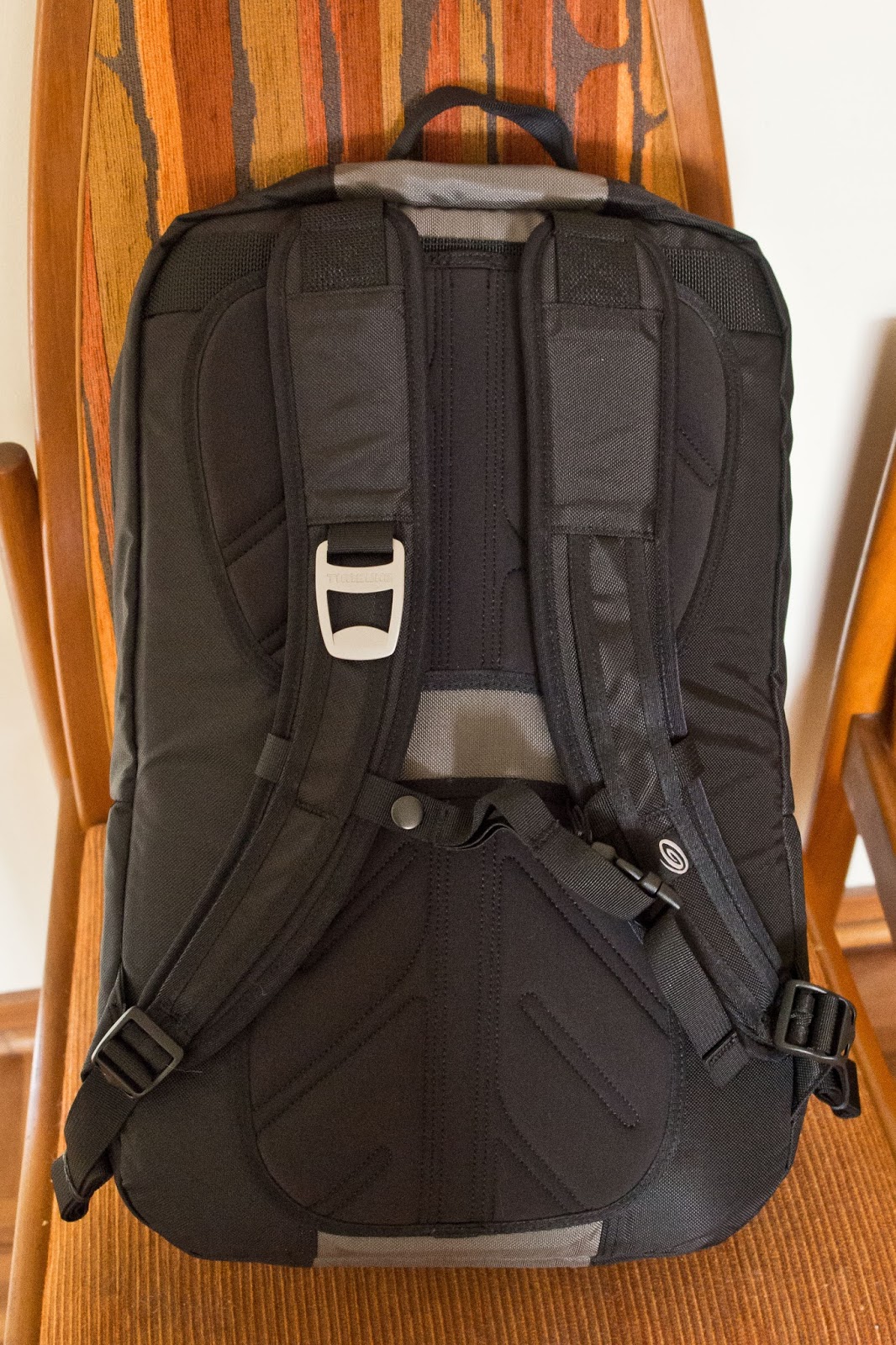
The bag seems very well made and has a quality feel about
it. It doesn’t have that “I am a camera bag” look which is a plus.
The outside of the bag is very simple. Two small zippered
pockets, provision for holding a tripod, a sternum strap to help keep the
shoulder pads in place and other than the zippers for the top and bottom
section, that’s about it. Oh, I forgot, a bottle opener that seems to be a
Timbuk2 trademark. There is a convenient carry loop at the top and the top
section zipper has a flap for rain protection.
A bit more than half the bag is devoted to the general
storage area which is fine for me. There is a dedicated camera sleeve and some
storage pockets in the top. Very generous padding ensures everything is well
protected.
The top section has a waterproof jacket, battery, rain cover
(not a standard inclusion of the backpack) and 13.3” laptop in the very well-padded
sleeve.
The bottom camera section has a double zipper that opens to
the bottom which means you need to take the backpack off to use. The zipper has
a very stiff press-stud to offer some time delay for would be thieves.
The bottom section contains a single z-shaped divider and
two small secondary dividers to split up the space. I think there should be one
more. In addition, the divider between the top section and camera section can
be removed. It is quite secure with Velcro on all sides. The Velcro holds well
but the camera section dividers do seem far too thick and too high while the
z-shaped divider could be a little longer.
The previous picture shows an Olympus E-P3 with Metabones Speed
Booster and Nikon 10-24mm f/3.5-4.5 lens attached (complete with hood), Olympus
60mm f/2.8 macro and SLR Magic 12mm T1.6 lens. Also in there is a Lee filter
holder, 3 x 150x100 filters, a Little Stopper and remote control. There is a
little bit of free space but the dividers make it difficult to optimise the
use. It is quite difficult to use the space well when you have a reasonably
long lens combination, e.g. the Olympus OM-D E-M5 and 40-150mm f/2.8 Pro lens
combination.
The backpack itself is reasonably comfortable without the
laptop but as with most backpacks that place the laptop against your back, less
so when the laptop is included. The straps could have a bit more padding and I
find the sternum strap, while adjustable, isn’t ideally placed. The back has
foam padding but as it lacks mesh, I would expect it not to be ideal for long
hikes in summer.
Pros
The bag is well made and offers heaps of protection. It is
also small aircraft cabin friendly. Great value for money. This would also make a really great urban walkabout bag.
Cons
The excellent padding and so-so partition design makes it
hard to optimise the space in the camera section and as a consequence of the
extra padding, a little heavy for its size. There are no drinks pockets and the
tripod storage means you cannot use the small external pockets when you have a
tripod attached. Rain cover is an expensive option.
Conclusion
Good value for money and quite suitable for a walk around
town or taking gear on aircraft. Not ideal for hiking or if you have bulky
gear.
Monday, 2 February 2015
ASUS Zenbook UX303LN Laptop Review
The Introduction
Welcome to my review of the Asus Zenbook UX303LN. This review covers the i7 version with 256 gb SSD, 8 gb of memory and FHD touch screen.
Digital photography has two main elements, the first of course is capturing the image which of course is the foundation of what you are doing. The second skill is the processing of the image and that requires a computer with a decent screen.
I changed from desktop machines to laptops quite a few years ago as I can take the laptop with me when I travel. My last laptop was a Toshiba P840 which was becoming quite frustrating to use. Crap keyboard and terrible screen. It worked OK if you plugged in a separate keyboard and external monitor but that defeated the versatility of being a laptop.
What to buy? Well I took several months to decide, looking at all the compromises - do I go to a larger 15.6" screen (the old one was 14") or head down to 13" screen. I knew I wanted more resolution and an IPS screen. But with travel a key component, 13.3" screens seemed a good choice and a 1920 x 1080 FHD screen seemed to be the sweet spot.
I also knew 8gb of memory would be fine and a SSD drive highly desirable to overcome slow start up times. Lighter was better, but I knew I could also use a separate graphics module to help speed up screen rendering of images (and also ensure all of that 8gb of memory was available for processing).
There were several machines that quite interested me, especially those from Lenovo which also have fantastic keyboards and are usually fairly easy to upgrade. The problem was the cost after you optioned up the machines with the right amount of RAM, a decent processor and other bits.
I started to see periodic sales of the ASUS UX303LN so checked it out. In the i7 version, it had enough RAM, a good screen and a 256gb SSD which was just adequate for purposes provided a lovely FHD screen into the bargain. I saw one for a good price from The Good Guys and ordered it to be delivered as the closet store was 200km away. Strangely, rather than assigning the order to closest store, it was assigned to one about 4000 km away. To say the service from the Good Guys was "good" would be far too generous. It was quite appalling and took 12 days for the computer to go from the back to the store to the front of the store for collection by the courier. The courier (StarTack Express) was stunning. Picking up the computer around 4:30 PM on the last Friday before Christmas and delivering it at 9:30 AM on the Monday morning. Not bad for a 3500 km air trip and then another 420 km by vehicle.
Now the Computer Review
The first thing that impresses is the packaging. While it comes in an ordinary looking cardboard outer box for shipping, inside is a glorious looking shrink wrapped box that looks so appealing. This looks something special.
Welcome to my review of the Asus Zenbook UX303LN. This review covers the i7 version with 256 gb SSD, 8 gb of memory and FHD touch screen.
Digital photography has two main elements, the first of course is capturing the image which of course is the foundation of what you are doing. The second skill is the processing of the image and that requires a computer with a decent screen.
I changed from desktop machines to laptops quite a few years ago as I can take the laptop with me when I travel. My last laptop was a Toshiba P840 which was becoming quite frustrating to use. Crap keyboard and terrible screen. It worked OK if you plugged in a separate keyboard and external monitor but that defeated the versatility of being a laptop.
What to buy? Well I took several months to decide, looking at all the compromises - do I go to a larger 15.6" screen (the old one was 14") or head down to 13" screen. I knew I wanted more resolution and an IPS screen. But with travel a key component, 13.3" screens seemed a good choice and a 1920 x 1080 FHD screen seemed to be the sweet spot.
I also knew 8gb of memory would be fine and a SSD drive highly desirable to overcome slow start up times. Lighter was better, but I knew I could also use a separate graphics module to help speed up screen rendering of images (and also ensure all of that 8gb of memory was available for processing).
There were several machines that quite interested me, especially those from Lenovo which also have fantastic keyboards and are usually fairly easy to upgrade. The problem was the cost after you optioned up the machines with the right amount of RAM, a decent processor and other bits.
I started to see periodic sales of the ASUS UX303LN so checked it out. In the i7 version, it had enough RAM, a good screen and a 256gb SSD which was just adequate for purposes provided a lovely FHD screen into the bargain. I saw one for a good price from The Good Guys and ordered it to be delivered as the closet store was 200km away. Strangely, rather than assigning the order to closest store, it was assigned to one about 4000 km away. To say the service from the Good Guys was "good" would be far too generous. It was quite appalling and took 12 days for the computer to go from the back to the store to the front of the store for collection by the courier. The courier (StarTack Express) was stunning. Picking up the computer around 4:30 PM on the last Friday before Christmas and delivering it at 9:30 AM on the Monday morning. Not bad for a 3500 km air trip and then another 420 km by vehicle.
Now the Computer Review
The first thing that impresses is the packaging. While it comes in an ordinary looking cardboard outer box for shipping, inside is a glorious looking shrink wrapped box that looks so appealing. This looks something special.
Next, peel off the shrink wrapping and raise the lid. Beautifully presented, neatly laid out and no wasted space.
Take all the goodies out of the box and it still impresses.
Take all the goodies out of the box and it still impresses. You get a brown fabric and fake leather computer sleeve, tiny power supply, dongles for USB to Ethernet adaptor and mini-DisplayPort to VGA and a cable strap (which is in addition to the ones on the cables). You also get the couple of sheets of paper (warranty, warnings and a pamphlet to get you going).
Inspection of the machine reveals are pretty neat looking device in its aluminium/pseudo aluminium casing.
The screen lid has a lovely brown-toned surface and the touch screen has gorilla glass or similar hard plastic that extends to the edges. No flimsy bezel to crack like an earlier ASUS laptop I have in the cupboard.
The screen hinge seems quite good - the movement of the screen fairly light but enough to be stable when open.
The base is made of a casting. It looks like aluminium but doesn't feel cold to touch. While it could be some sort of alloy, doesn't get really cold to touch. It is very rigid and looks great. The bottom appears to be a sheet of anodised aluminium.
Plug her in, charge it up and away we go. First start up is the normal Windows 8.1 and fairly easy and nowhere near as annoying as it use to be. It all fits rather well although not quite like the hewn out of rock build of say a MacBook Pro - but pretty close.
On the left you get two USB3 ports and a card reader. Cards stick out quite a way when inserted. On the right you get a mini-DisplayPort, single USB3, HDMI port and headphone/audio port. On this side is also the power input.
The keyboard has quite nice keys. Not quite up to the standard of say a Lenovo keyboard but well spaced and with adequate travel. You can type at a moderate speed and be fairly accurate with this keyboard and it has variable backlighting which makes it great for working at night with minimal lighting. The only minor dislikes are the lack of dedicated keys for pgup, pgdn, home and end. These are shared with the scroll keys and require the fn button to activate. The power button looks like a normal key in the top-right corner of the keyboard but this hasn't caused any problems so far.
The track pad seems OK, very large and reasonably sensitive. Some reviews I have read claim the track pad surface is glass but it certainly is not. It has a similar look and texture to the laptop keyboard surround but is a separate element. I don't like track pads and normally use a wireless mouse so not much else to say about it.
The screen. It's stunning. Compare new and old side by side.
The tonal range is brilliant. The old Toshiba on the right is totally outclassed. The first job as usual is to calibrate the screen with my Spyder4Pro. Uncalibrated, the screen was 98% of sRGB, after calibration, it was also 98% of sRGB. There was a change after calibration but is was so minor, the screen could have been left as it was. Note, the screen also achieves a stunning 76% of the full AdobeRGB palette. As with any IPS screen, the viewing angles are magnificent. That's better than a MacBook Pro Retina 13!!!
While having a touch screen also results in a glossy surface, it isn't quite as glossy as the old Toshiba and the brightness is in another league and it is quite visible when viewed in shade outdoors and you can still manage (just) with full sun.
After installing the software, I was rather disappointed with the performance of Photoshop CS5 until I realised the machine did not automatically apply graphics acceleration to CS5. This may have been due to the older version of the software but a quick tweak of the graphics engine to force it to use the dedicated Nvidia Geforce 840M processor soon fixed that.
I must admit the processing improvement isn't huge compared to my old i5 processor. That old processor had clock speeds of 1.8 GHz and 2.7 GHz turbo while the new processor 2.0 GHz and 3.1 GHz turbo (but only 2.8 GHz with both cores driven). There is an improvement, but it isn't spectacular.
Likewise, the move forward from the Nvidia Geforce GT 630M to the newer Nvidia Geforce 840M is not sensational either. Still, every bit counts.
What else - oh, that SSD is brilliant. I would never have a normal hard disk as a main drive. There is no going back. One thing I like about the ASUS is that it is upgradable (after removing something like 13 teeny screws from the base). I can upgrade the memory to 12 gb and the SSD can be swapped out for a larger one and there is even a free mSATA half-sized slot that can take another drive. Half-sided SSDs are currently available to 128 gb but I expect that may grow.
Overall, a very nice machine. Very light and compact, well built, some upgrade potential, a stunning screen for photo editing, adequate performance for Photoshop CS5 and other photo editing software and reasonably priced for a light 13.3" laptop.
Sunday, 18 January 2015
Olympus 40-150mm f/2.8 - more photos
This selection of photos was taken at the Candelo show today using the Olympus 40-150mm f/2.8. These photos are generally at the 150mm end of the zoom and at f/2.8. They show great detail for a zoom lens wide open at the extreme end of its zoom.
Saturday, 17 January 2015
Olympus 40-150mm f/2.8 Review
I bought the Olympus 40-150mm f/2.8 mainly due to my interest with photographing musicians and they tend to play indoors from time to time. That test will have to wait, but here is my first impressions review.
The first thing that impresses about the Olympus 40-150mm when first come across it is the size of the box. Is this really a Micro Four Thirds lens or is it full frame. That’s one big box for a zoom lens that only extends to 150mm.
Unboxing, the lens is far smaller as it only occupies the bottom part of its huge container. There is some empty cardboard which is presumably for the optional tele-converter, the lens hood and a rather thick and substantial bag for the lens. The lens itself wrapped in plastic with the sliding hood reversed and over the outside of the lens.
On the camera, the lens doesn’t look nearly so large unless you extend the generous hood.
The feel is superb. It looks quality and feels quality with
a combination of metal and top-grade plastics. The fat zoom ring and the focus
ring feel very nice. The usual snap manual focus a joy to use.
The first thing that impresses about the Olympus 40-150mm when first come across it is the size of the box. Is this really a Micro Four Thirds lens or is it full frame. That’s one big box for a zoom lens that only extends to 150mm.
Unboxing, the lens is far smaller as it only occupies the bottom part of its huge container. There is some empty cardboard which is presumably for the optional tele-converter, the lens hood and a rather thick and substantial bag for the lens. The lens itself wrapped in plastic with the sliding hood reversed and over the outside of the lens.
On the camera, the lens doesn’t look nearly so large unless you extend the generous hood.
The lens hood is very clever and so simple, a little twist
of the ring and pull it back when not in use makes the 40-150 relatively
compact (but stubby) when not in use. You never have to take it off.
The tripod collar is just the right size and is very sturdy.
It can be removed if you need for total hand-held shooting and while the foot
of the collar is small, it seems very sturdy when mounted. I use Arca-Swiss style
quick release plates and while the 60mm plate I use most frequently seems a
little large, I can flip up the front anti-rotation tabs when using on the
collar – very nice.
Handling is really good when coupled to the Olympus OM-D
E-M5. This lens is never too big and works fine hand-held or on a tripod.
The photos produced by this lens are very sharp, even at
f/2.8 and always very good contrast. The focus is reliable and focus speed
adequate in good light and gets there without hunting in poor light. Streets
ahead compared to my previous telephoto zoom, the Panasonic 45-200mm which is
neither very sharp and a dog to focus on Olympus cameras.
Well,
is the Olympus 40-150mm f/2.8 perfect? No. I do have a couple minor disappointments.
Focus speed is not stellar in good light. I was expecting something closer to
the speed of the 12-40mm zoom; however, it is quite adequate for purpose. A focus limit switch would
have been nice and would speed things up with normal use. Another issue also
concerns focus but in this instance the manual focus and the excessive amount
of travel beyond the infinity mark before it reaches the hard stop. I really think Olympus could be a bit more precise here.
Overall,
a fabulous lens and worth every cent.
Monday, 26 May 2014
The camera you take when not taking a camera - Review of the Sony DSC-HX50V
There are many times that I have been strolling/bush walking
or out for a short drive when I have wanted to take a photo and all I have is
my camera phone which basically sucks in most situations. Maybe you want to go
on holiday and travel very light.
I have had simple point and shoot cameras in the past and
thought it may be time to re-visit one as a pocket camera for times like above.
My partner, Chris isn't one to twiddle with settings to get the best photo and
we are often out where she wants to take a snap. While Chris tends to spend
large sums of the latest mobile phone, some of which have half-decent cameras,
they often come up wanting in anything remotely challenging.
I bit the bullet and was about to buy a Samsung WB350. Not
the greatest of cameras but just right for Chris and acceptable photo quality
for sharing. The WiFi functionality was a big drawing point for Chris. The
price was great as there was a sale on but now living outside a large
metropolis, by the time Chris got to the store, the sale was over and the
camera had gone up in price from around $249 to $299 (everything is more
expensive in Australia). For just a couple of dollars more, it was possible to
do much better. I had seen the Sony DSC-HX50V for sale for $349. While it had
been superseded, the reviews were good and it seemed like much better value.
According to Internet, my local electronics store had the newer version for
sale at $449 but that was getting a bit much (and quite often they need to
order in stuff). What a surprise when I popped in and saw the Sony DSC-HX50V
for $349. A little bit of haggling and it was mine for $329 or just $30 more
than the Samsung.
The camera is small, amazingly small for a camera with a 30x
zoom lens. Frankly, if the body was any smaller, it would be cramped. Build
quality is solid and controls are well placed. It even has an external flash
shoe of a Sony design for their fancy (overpriced) accessories that will take a
standard ISO shoe flash. Tried it out with my Olympus FL14 flash on the "auto"
setting and it works fine after a little experimentation with settings (and
greatly extends the flash range).
About the only comment regarding the build quality would be
the battery door which is a little too easy to open accidentally.
Taking pictures - I trialled the camera on the
"Superior Auto" mode as this is what Chris would most likely be using
and the results are impressive. Best to look at the results. All shots are
hand-held, the camera has chosen all settings and none have been overridden,
some night shots have ISO boosted to 12800 and have come out surprisingly well.
Maybe not for printing wall sized posters but ideal for social media, general
viewing online and printing small prints. Images shot in better light where ISO
is kept to ISO 800 are excellent. A big improvement over a mobile phone and
certainly better than any of the compact cameras I have had in the past.
Credit - the last 3 photos were taken by Chris.
Subscribe to:
Posts (Atom)